Ads workflow
AI video ad generator: from product link to finished ad
Paste a link to your product page. AutoReel reads the product, writes a creator script in the angle you pick, puts your product in an AI creator's hands and exports a captioned, lip-synced MP4 ad for TikTok, Reels and Shorts.
what it does
A creator ad from a link, not a shoot
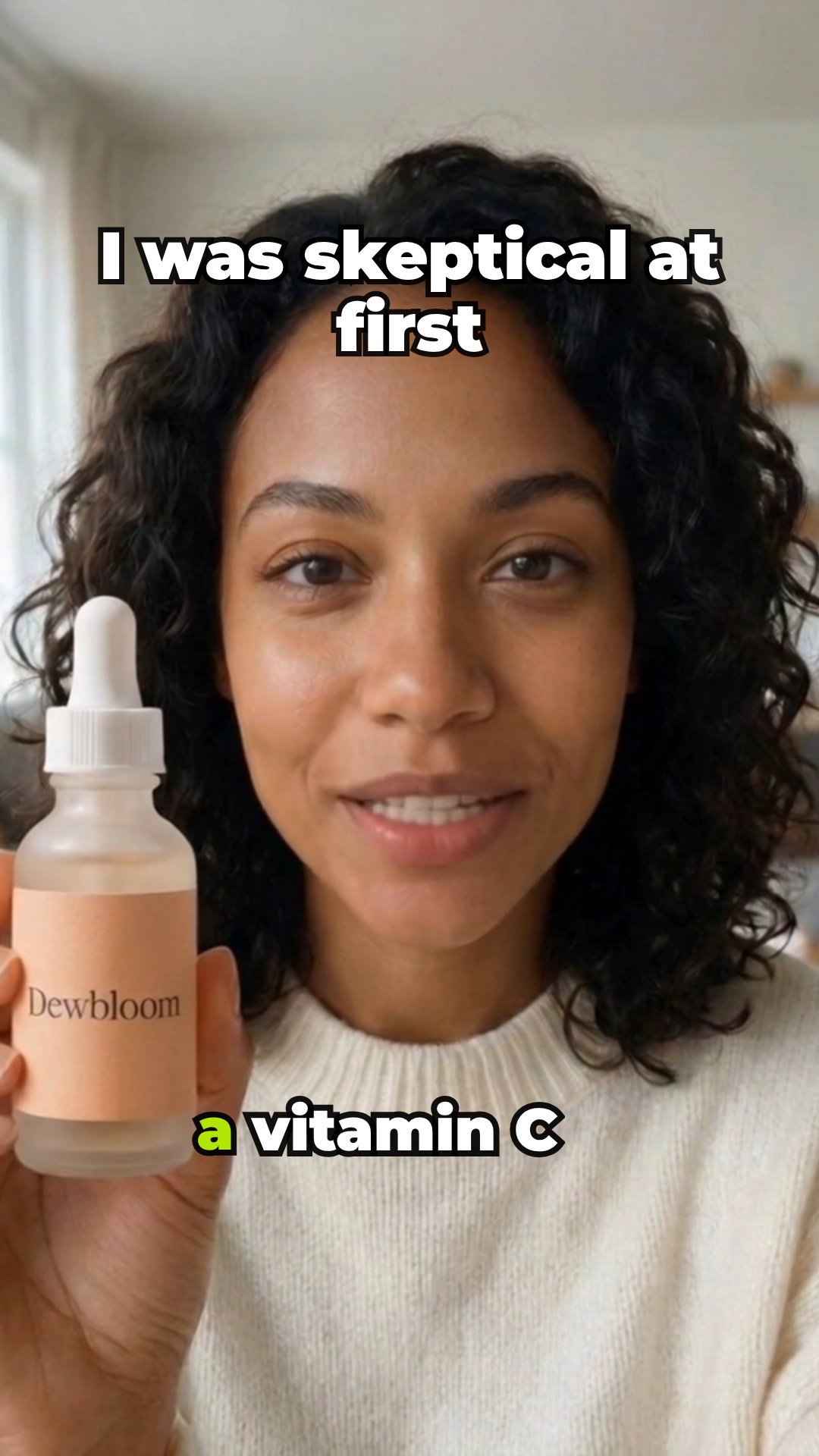
The video ads that hold attention on TikTok, Reels and Shorts usually look like a person talking about something they bought. Making one the usual way means finding a creator, shipping the product, writing a brief and waiting for a draft. The product ad workflow runs that loop for you, and the product page is the brief.
AutoReel opens the page and pulls the product's name, description, price and photos, then hands them to the script writer with your brand kit's voice and call to action. The writer is told to stay with what the page and your notes support, and you can read every word before anything is generated. You pick the angle and the length; AI handles casting, voice, lip-sync and the edit.
Each run makes one ad. Want variations to test? Switch the angle or rewrite the hook and run it again. Every version is a normal reel in your workspace, so any of them can be opened in the editor and changed later.
how it works
How it works
One input, then AI runs every step below. Review the plan first, or let it go straight to a finished MP4.
Step 1: Paste the product link
Drop in a product page URL, or describe what you sell and upload up to four photos. AutoReel reads the page's name, description, price and images. With no link at all, it uses the product saved in your brand kit.
Step 2: AI writes the script and casts a creator
The script follows the angle and length you chose: a hook first, the product by name, one concrete benefit, then your call to action. AI picks the best-matching creator from your library unless you choose one, and adds a short on-screen hook when it helps.
Step 3: Your product goes in their hands
An image-editing model places your product in the creator's hands with the label facing the camera, keeping their face and setting. The voiceover is generated, and a talking-avatar model lip-syncs the creator to it.
Step 4: Captions, end card, export
Captions are added to the voice, a product card with a short line closes the ad, and the MP4 exports by itself at the best resolution your plan allows.
what you get
What you get
A finished MP4, ready to post
Vertical 9:16 by default, or 1:1 and 16:9 for feeds and ads. Choose 15, 25 or 40 seconds.
Your product on screen twice
In the creator's hands while they talk, then on a closing product card with a short call to action.
The plan before you spend
Review plan first shows the idea, the script, the shots and the credits for each step. Edit the script there and the voice, lip-sync and captions follow your words.
A reel you can keep editing
After the build it opens like any reel: change captions, on-screen text, timing or music, then export again.
who it's for
Who uses it, and for what
E-commerce and DTC brands
Turn product pages into creator-style ads, and find the angle that sells before paying for a real shoot.
Performance marketers
Keep ad accounts stocked with fresh creatives: same product, new hook, new angle, no new brief each time.
App and SaaS founders
Use the app demo angle: a creator walks through the one feature that sells your product, the way a user would.
Agencies
Draft ads for every client's products from one workspace, each with its own brand kit and voice.
tips
Tips for better results
Start from a clean product page
A clear product name, a real description and a few photos on a plain background give the best results. If the page is thin, add a sentence about who it's for to the prompt.
Upload the photo you want held
Your uploads are used before the page's photos. A front-on shot of the product or packaging, label visible, looks most natural in the creator's hands.
Test one angle per run
Run a review, then problem → fix, then an unboxing of the same product. Different angles reach different buyers, and comparing them tells you what to scale.
Check the claims before you generate
Open Review plan and read the script for prices, names and promises. You know your product; the AI only knows the page.
related
Keep exploring
Workflows that pair well with this one, the models behind it, and the features that go deeper.
Related workflows
- AI UGC videoAn AI creator talks about your product, perfectly lip-synced.
- Product spotA cinematic product commercial from one photo. No people needed.
- Hook + demoA scroll-stopping AI hook stitched to your product demo.
- Remix a winning adUpload an ad that works and remake it for your product, with new hooks.
Models it uses
- Nano Banana 2 EditStandard quality
- Seedream 5.0 Pro EditStandard quality
- VEED Fabric 1.0Standard quality
- Kling AI Avatar v2 ProStandard quality
- InfiniteTalkStandard quality
- Nano Banana Pro EditBest quality
- GPT Image 2.5 Sunburst EditBest quality
- Seedance 2.5 Talking AvatarBest quality
- OmniHuman 1.5Best quality
Go deeper
faq
Product ad: questions
What do I need to make a product ad?
A link to the product page is enough. You can also describe the product in a sentence and upload up to four photos, or leave both empty and let AutoReel use the product saved in your brand kit.
Which product pages can it read?
Public product pages on most store platforms. AutoReel reads the page's structured product data, its social preview tags and its photos. Pages behind a login, or that block automated visits, may not import; describe the product and upload photos instead.
Is the creator a real person?
No. The stock creators are AI-generated portraits of people who don't exist. You can also pick a creator you made in your library; if it's based on a photo of a real person, you need their consent first.
Can I choose the angle, length and format?
Yes. Pick review, unboxing, tutorial, problem → fix or app demo; 15, 25 or 40 seconds; standard or best quality; and 9:16, 1:1 or 16:9.
How is this different from the AI UGC video workflow?
Both put a creator on camera. Product ad starts from your product page and always works the product in, in the creator's hands and on the end card. AI UGC video starts from a sentence and suits any topic, with or without a product.
Can I run these as paid ads?
Yes, the exports are yours to post or run as ads. Follow each platform's ad policies, including any rules on labelling AI-generated content.
Your next reel is one prompt away.
Start with 100 free credits. No card needed.